

GoPro 3D replay
Your GoPro laps in 3D, against your ghost
The GPS of your GoPro is in the video file. Drop it on the 3D replay: LapViz reads the GPS in your browser and replays your laps on the satellite view of the circuit, against the ghost of your best lap or of a friend.
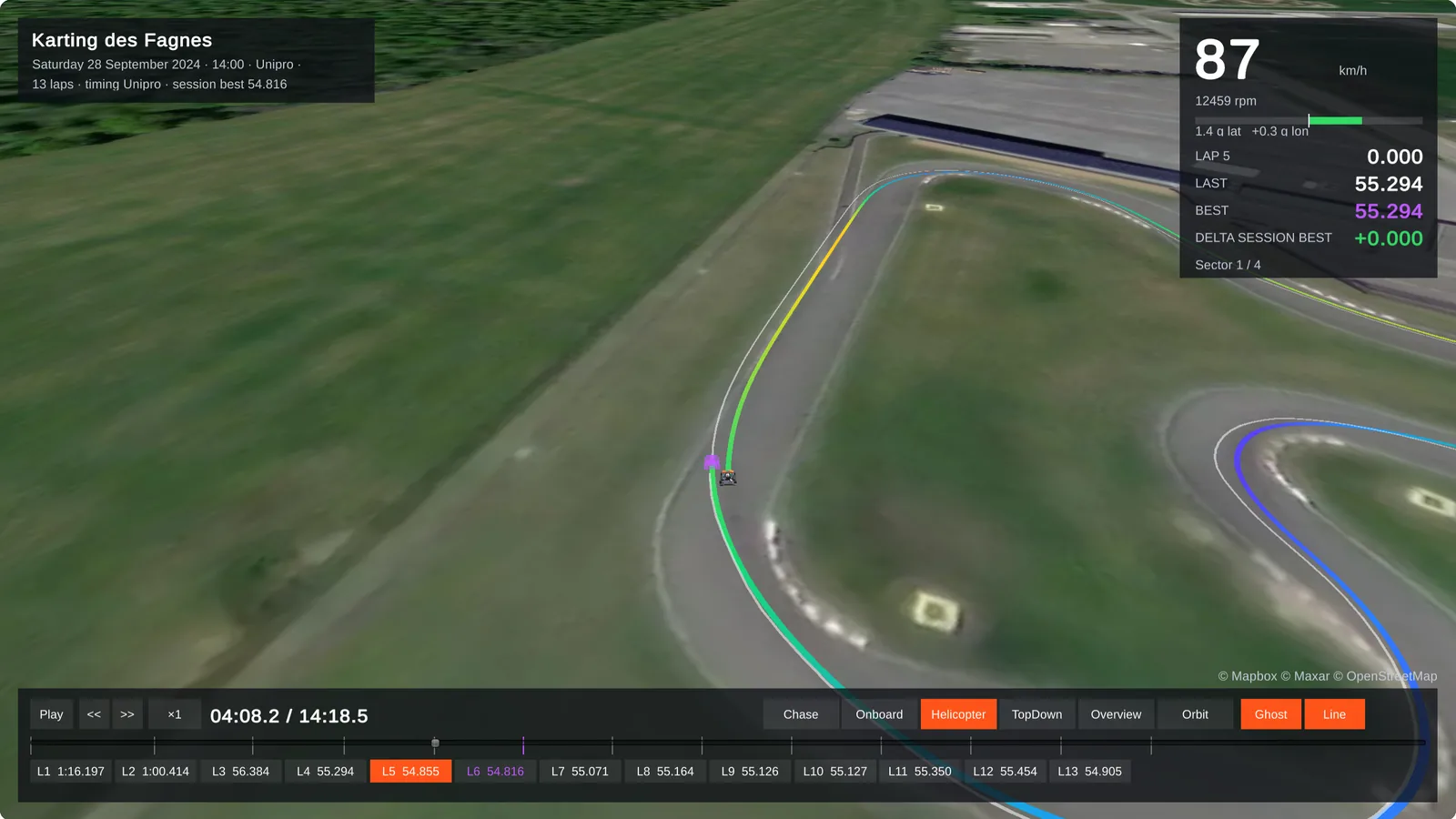
What you see
Your laps like in a racing game, from the GPS of the camera.
- Every lap against the ghost of your best lap, with the live gap
- Chase, onboard and helicopter cameras
- Your line on the satellite view of the circuit
Race against a friend
Two files: the second one is the ghost.
- Your GoPro against the GoPro or the laptimer of a friend, on the same circuit
- With a free account: the best laps of the circuit as ghosts
- The chapters of a recording count as one file
What the GoPro needs
A few conditions for laps and a clean line.
- The GPS turned on, and a GPS fix before going out on track
- A circuit known by LapViz: the laps are calculated on it
- A good satellite signal: with a weak one, LapViz warns you that the line and the laps may be wrong
From the GoPro to the 3D replay
A few minutes, nothing to install.
- Copy the MP4 files of the GoPro to your computer, with a card reader or a cable
- Open the 3D replay and drop them, all the chapters of a recording together
- LapViz reads the GPS of the video in your browser: only the GPS is sent, to calculate the laps
- Watch your laps against the ghost of your best lap, and change the camera
- Drop a second file to race against a friend, or create a free account to keep the session
Try it now, without an accountFree
Drop a file of your logger or lap timer: nothing to install, no sign-up.
LapViz Studio
The analysis in your browser: the file is read on your computer and is not uploaded.
- Your laps overlaid, from several sessions and drivers, with the delta
- Every channel of the logger, by time or by distance
- Sectors, rolling best and ideal lap, track map on the satellite view
- On-board video synchronized with the data
3D replay
Your laps on the satellite view of the circuit, like in a racing game. The file is converted to be replayed, not kept.
- Every lap against the ghost of your best lap
- A second file as the ghost: race against a team-mate or a rival
- Chase, onboard and helicopter cameras, speed, revs and live gap
- The sound of the engine, following the revs of the session
Keep your sessions with a free account
Import your files into LapViz to find them everywhere and compare yourself with the others.
- Every session kept, on the web and in the LapViz app
- Leaderboards per circuit and category
- Corner by corner analysis of every lap
- Sessions shared with your coach or your team
Frequently asked questions
Is my video uploaded?
No. LapViz reads the GPS of the video in your browser and sends only this track to calculate the laps; the video stays on your computer.
Does the 3D replay show my video?
No: it draws your laps on the satellite view of the circuit. To put the gauges of your session on the video itself, use the telemetry overlay.
Why are there no laps?
The laps are calculated on the circuits known by LapViz: an unknown circuit, a GoPro without a GPS fix or a very weak signal give no laps. A missing circuit can be submitted from the circuits page.
Do I need an account?
No, the 3D replay is free and open to everyone. A free account keeps the session and gives the laps of the other drivers of the circuit as ghosts.
Also in the LapViz suite
- GoPro telemetry overlay Turn your GoPro files into an on-board video with lap times, delta and track map, with or without a laptimer. Your video is never uploaded.
- GoPro lap times Drop the video of your GoPro with GPS: LapViz finds the laps on the circuit, draws your speed and line, and syncs the video with the data of your logger.
- Lap analysis See where you lose time in each corner: ideal lap from the mini-sectors, braking points, minimum speeds and your progress on each circuit.